What's new in Slate: May 2026
At a glance
- Team Themes (Pro): save brand-approved theme presets the whole team can apply, and set one as the team default so new courses start on-brand.
- Knowledge check attempt limits: cap retries per question, reveal the answer when a learner runs out, and eliminate wrong options between tries.
- Writing style for Slate AI (Standard and Pro): set spelling, terminology, and tone once and every AI draft follows it.
- Credits page in Settings: a running log of every AI credit used and refilled, broken down by feature, with a per-member view for Pro teams.
- Covered in their own posts this month: live voice course planning, faster AI translation, more reliable exports, and Codex support for Slate MCP.
- Plus: referral credits, stylized band dividers, a one-click media cleaner, side-by-side plan comparison, promo codes at checkout, brand extraction at signup, and more.
May was a heavy month, with around thirty changes shipping across the builder. A handful of the bigger ones already have their own posts, so this is the round-up: the meaningful new features in full, quick links to what we covered separately, and a list of everything else.
Team Themes (Pro)
Theme presets let you save a course's look once and reuse it. Team Themes extends that to a whole workspace: save brand-approved presets that anyone on your team can apply to any course, and set one as the team default so new team courses open on-brand instead of on the stock theme.
It is configured from the new Branding Settings hub, which brings theme presets, the team default, and the brand assets behind them into one place. For agencies and in-house teams, it means the brand decision gets made once by whoever owns it, and everyone else just picks from the approved list. Team Themes is part of Pro.
Knowledge check attempt limits
Knowledge checks now have proper control over how a learner can retry. You can decide how many times a question can be attempted, whether the correct answer is revealed once they run out, whether per-option correctness is highlighted, and whether the feedback band shows at all. Multiple-choice blocks add an option to eliminate wrong answers between attempts, so a second try narrows the field instead of repeating the whole question.
Set it once on the Theme page to cover every knowledge check in your lessons, then override individual blocks where you want different rules. For now these controls apply to knowledge checks within lessons; we're working on extending them to scored assessments in June.
Writing style for Slate AI (Standard and Pro)
Slate AI lets you set preferences once and have them applied to everything it drafts. Writing style is the third of those personalization fields, alongside Course context and Image prompt. Use it to lock in spelling conventions (Canadian, British, or American), preferred terminology, acronyms and how they should be expanded, and the tone you want, from plain and direct to warm and conversational.
Once it is set, every generated lesson and course follows it, so you stop making the same edits after each generation. If your organization always writes "colour" and "sign in", never "log in", and refers to staff as "team members", you say so once and the drafts come back that way.
Credits page in Settings
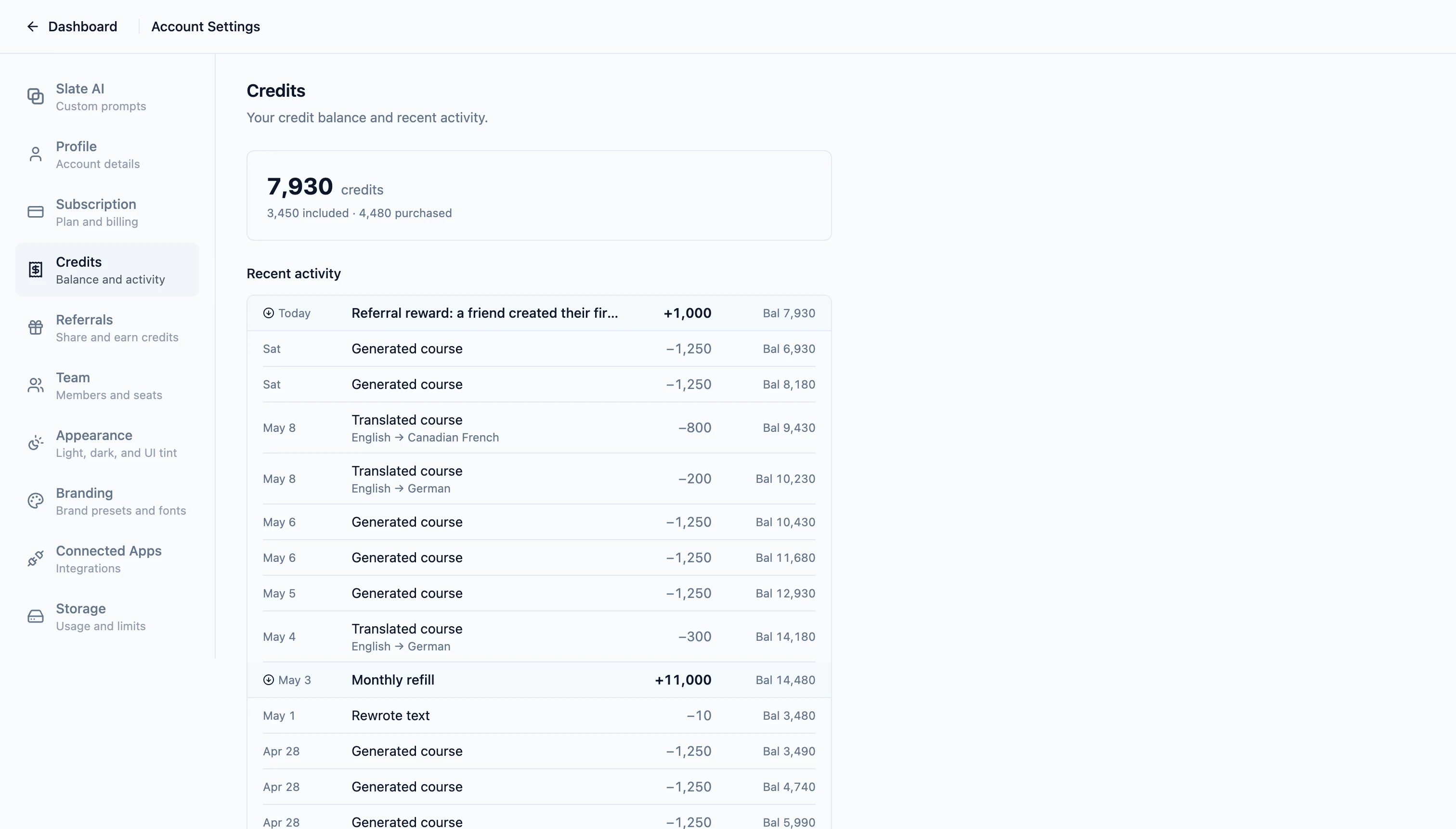
AI features run on credits, and until now there was no single place to see where they went. The new Credits page in Settings is a running log of every credit your account has used or refilled, with timestamps and a breakdown by feature, so you can see exactly what is drawing down your monthly balance: course generation, image generation, translation, voice, and so on.
On Pro team plans, admins and owners also get a workspace view that shows which member spent what, which makes the shared credit pool a lot easier to reason about. Teams also got a pooled Live Voice budget this month, so the same kind of shared visibility now applies to voice minutes.
Already covered this month
Four of May's bigger releases got their own write-ups. The short version, with links to the full posts:
- Live voice planning, faster translation, and more reliable exports: plan a course out loud with Slate AI in real time, translate long courses with a glossary that keeps brand terms consistent, and export across SCORM, HTML, xAPI, cmi5, and PDF with media refreshed and integrity-checked first. Read more.
- Slate MCP now works with Codex: connect Slate to OpenAI's Codex desktop app and draft, review, and share courses end to end. Codex joins Claude as a supported MCP client. Read more.
- Refer a friend, earn credits: share your referral link, and the first time a friend generates a course you both earn 1,000 purchased credits that never expire. On every plan. Read more.
- eLearning as Markdown: write a whole course as a folder of LESSON.md files, then import the bundle into Slate, with the free, open lesson-md agent skill teaching your AI to author and validate them. Read more.
Also shipped this month
- Stylized band dividers: give any solid-colour block background a shaped top or bottom edge (wave, curve, tilt, triangle, mountains, clouds, zigzag, scallops, steps, or fade), each independent, with height adjustment and horizontal flip.
- Compare plans side by side: refreshed plan cards and a side-by-side comparison on the subscription page, so you can see exactly what each tier includes before upgrading.
- Promotion codes at checkout: apply a promo code on the subscription page, validated before checkout so you see the discounted price before you commit.
- Free up space: find and remove media you aren't using in one click. Slate surfaces unreferenced images, audio, and documents, and protects files used in theme presets, templates, and cover pages.
- Brand extraction at signup: drop in your website at signup and Slate pulls your brand colours and logo automatically, so your first course is on-brand without a setup detour.
- Quicker first course: pick a starting point right from an empty dashboard, so getting your first course off the ground is one click instead of several screens.
- Pooled Live Voice budget for teams: team workspaces share a single Live Voice pool of 90 minutes per seat, refilled each cycle, with the workspace total shown in the usage panel.
- Smarter MCP routing: sharper tool descriptions and built-in workflow primers help connected AI assistants resolve requests in fewer back-and-forths, and tag filtering on the course list is now available on Standard, not just Pro.
- Redesigned Resources dialog: the editor Resources dialog now leads with featured companions and flat tiles, so the apps, skills, and guides that work alongside Slate are easier to find mid-build.
- Per-block vertical spacing: tighten or expand the rhythm above and below any block with a slider in the block toolbar, with a one-click reset.
- Rich text toolbar upgrades: cleaner rich-text editing across text, notes, accordions, tabs, cards, flip cards, and labelled graphic hotspots, with alignment plus font, size, and colour controls.
- AI Writing Assistant in card content: card and flip-card text now include the same AI Writing Assistant as other rich-text blocks, with quick actions to expand, shorten, or shift tone.
- Course language picker in AI Chat: a language chip next to the chat input lets you set the course language right where you work, kept in sync with Settings.
- Quick actions menu in the editor: a floating action button on Course Overview and the Lesson Editor surfaces the light or dark theme toggle, UI tint swatches, and Resources in one place, now on every viewport including mobile.
- App shortcuts for chat and voice: when the Slate app is installed, the icon offers jump-in shortcuts to start an AI chat or a voice session. Right-click on Windows or macOS, long-press on Android.
- Account deletion and legal links: sign-in and signup pages now link to Terms and Privacy, and you can delete your account from Settings once active subscriptions or team ownership are resolved.
- Consistent lesson counts: course cards, list rows, import previews, AI summaries, and version history now show the same lesson count, excluding cover, conclusion, and assessment-only lessons.
What's next
Update, August 2026: Slate for Canva is now available in the Canva Apps Marketplace. Convert a Canva presentation into an interactive SCORM course, then refine and publish it in Slate.
An offline desktop builder: we have been building Slate Builder X, a desktop version for authoring without a connection. More to share soon.
Where to go next
A snapshot of what we're working on next lives on the roadmap, and feature requests are always welcome on the feedback page.