Slate MCP now works with Codex
Codex Desktop is now an officially supported Slate MCP client. If you use OpenAI's Codex app, you can connect it to Slate in about two minutes and start managing your eLearning course library through conversation, the same way course authors on Claude Desktop, Claude.ai, and Claude Code have been doing since February.
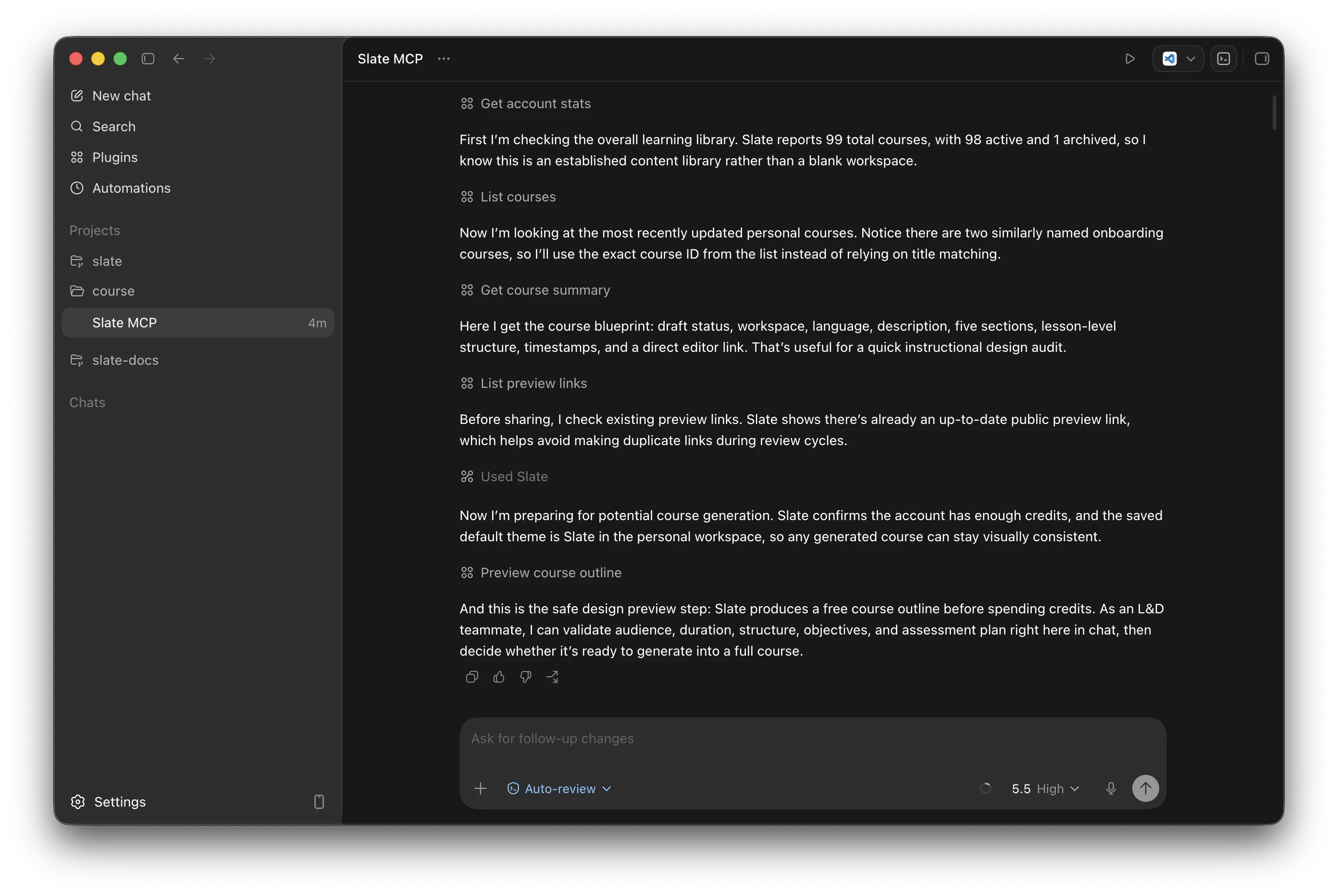
What you can do from Codex
Slate MCP is available on Standard and Pro. Course authors on the Standard plan get the core authoring and library tools; the Pro plan adds review cycles, tag management, and account-wide discovery on top. From inside Codex Desktop, you can:
- Draft a course from a prompt: Tell Codex who the course is for, how long it should run, and what source material to start from. It sketches an outline first so you can review it, then generates the full draft in your chosen language (one of 15 supported), grounded in Gagné's Nine Events of Instruction and Mayer's Multimedia Principles.
- Manage your library through conversation: List, search, and filter courses. Ask for a summary of any course by name. Open it in the Slate editor with a direct link.
- Run review cycles: Open a review, generate AI summaries of stakeholder feedback, and turn comments into an actionable checklist. (Pro)
- Share a preview link: Ask Codex for a public preview URL you can send to anyone. No LMS or Slate account required.
- Look up docs and the LESSON.md format: Codex can search the official Slate documentation and the open LESSON.md authoring format on its own, so it can hand back content that imports straight into Slate.
A full list of tools, with which ones are Standard versus Pro, lives on the Slate MCP page.
Why this matters
Slate is built around supporting a broad range of workflows and providers. A course can start from a Canva presentation, a PowerPoint deck, a blank page, or a conversation with the AI tools you already have open. Once it's in Slate, the same flexibility applies to how you manage it: connect Claude or Codex through MCP to draft, review, tag, and share courses without changing tools.
And because the connector is a standard MCP server over Streamable HTTP, it isn't limited to those two. Any MCP-capable agent can point at the same endpoint, so clients like GitHub Copilot and Cursor connect with the same URL and the same sign-in. Claude and Codex are the clients we officially test and support, but if your assistant speaks MCP, it should work with Slate.
Setup is two minutes
Open Codex Desktop, go to Settings › MCP Servers › Add Server, name it Slate, choose Streamable HTTP, and paste https://mcp.slatebuilder.io/mcp. Codex opens a browser window for you to sign in, and stays connected after that. Step-by-step screenshots are on the Codex Desktop setup tab.
What's next
A dedicated Slate listing in the ChatGPT app marketplace is up next, so teams who do not run the Codex app can connect Slate in a click rather than going through manual setup. The current client roadmap lives on the MCP page, and we keep the product roadmap updated as items ship.
If you are already on Standard or Pro, the new Codex tab is live now in setup instructions. New to Slate? Sign up free and try the MCP connector as soon as you upgrade.