Standard now includes video and document uploads
At a glance
- Video and document uploads on Standard: Previously available only on Pro, video and document uploads are now included on all paid plans.
- New Storage section in settings: See exactly how much storage you are using and how much is available on your tier.
- Storage limits by tier: Free includes 500 MB (images and voiceover), Standard includes 5 GB, Pro includes 15 GB.
- Lighter courses, better performance: Using embeds over uploaded media keeps SCORM packages small, which means faster LMS uploads and smoother learner experiences.
- SCORM exports don't count: Exports are generated on-demand and are not stored against your limit.
What's new
Starting today, video and document uploads are available on Standard plans. Previously, these file types were limited to Pro subscribers. Now, any paid plan lets you upload video files (up to 250 MB each) and documents like PDFs (up to 50 MB each) directly into your courses.
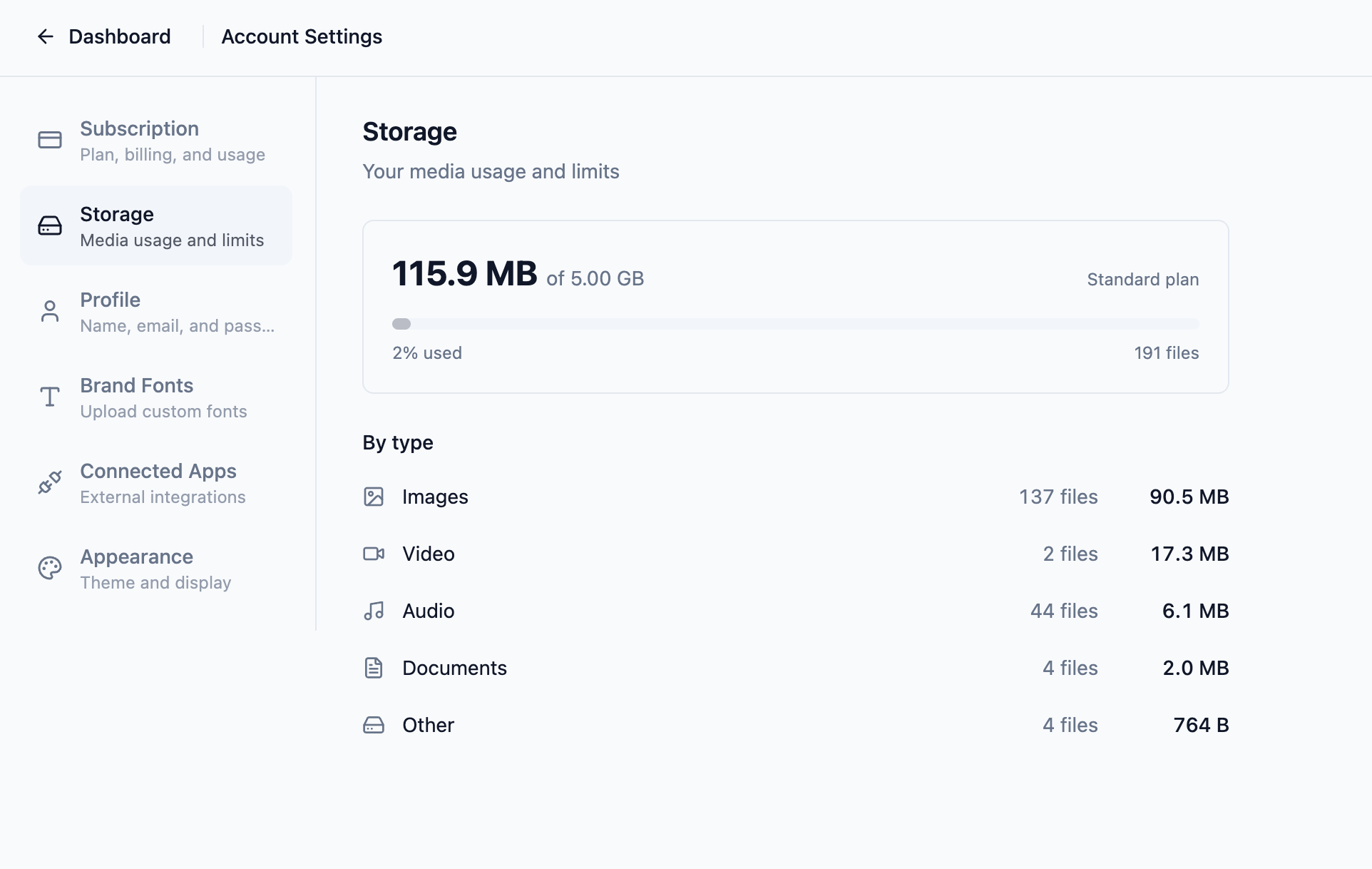
We have also added a Storage section in your account settings. You can now see how much storage you are using, what your tier's limit is, and how much space you have left. No guessing.
Storage limits by tier
Every Slate account includes a storage allowance based on your subscription tier:
| Tier | Storage |
|---|---|
| Free | 500 MB (images and voiceover) |
| Standard | 5 GB |
| Pro | 15 GB |
Individual file uploads also have per-file size limits:
| File type | Max size | Available to |
|---|---|---|
| Image | 10 MB | All tiers |
| Audio | 50 MB | All tiers |
| Video | 250 MB | Paid plans |
| Document (PDF) | 50 MB | Paid plans |
| SCORM/ZIP import | 500 MB | All tiers |
The Free tier supports image and audio uploads, including AI-generated voiceover narration. Video and document uploads are available on paid plans. Video streaming and document downloads carry additional bandwidth costs on our end, and we already cover AI features on the Free tier, so reserving these file types for paid plans helps us keep Slate sustainable.
You can view your current usage in the new Storage section under account settings.
What counts toward your storage
Your storage usage is the total size of uploaded media files in your account: images, audio, video, documents, and fonts. That is it.
The following do not count against your storage limit:
- Course text and structure (lessons, quizzes, text blocks, links, layout)
- SCORM exports (generated fresh each time you export)
- Embedded media from external providers (YouTube, Vimeo, etc.)
- Preview and share links
On paid plans, using embedded video (YouTube, Vimeo) instead of uploading files directly is a good way to conserve storage, especially for video-heavy courses.
Helping you make the most of your space
When you upload an image, Slate automatically resizes it to a maximum resolution of 1080p and applies light compression to optimize file size. This happens seamlessly and does not affect visual quality in your courses. It does mean your images use less storage than the original file size.
If you want to go further, tools like Squoosh let you compress images before uploading. Smaller images mean faster-loading courses and lighter SCORM exports, which makes a real difference for learners and LMS uploads.
We are also working on better optimization for AI-generated images. Currently, images created through Slate's AI image generation are saved at their original output size. A future update will apply the same intelligent compression we use for uploaded images, so AI-generated visuals take up less of your storage automatically.
Why these limits exist
Without clear storage limits, a small number of accounts with very large media libraries could drive costs high enough to force pricing increases that affect everyone. Storage limits are a cost control that keeps pricing fair for all course authors.
A note on SCORM export size
SCORM exports are not stored on our servers. They are generated on-demand when you click export, then downloaded to your machine. Because of this, exports do not count against your storage limit.
That said, some Learning Management Systems struggle with very large SCORM packages. Slate will show a soft warning when your export approaches 500 MB and a stronger warning above 1 GB. If your course includes uploaded video, consider using embedded video (YouTube, Vimeo) to keep export sizes manageable for your LMS.
Full details
For the complete legal language, storage limits are documented in our Terms of Service. You can compare plans on our pricing page, and if you have questions or feedback, we would love to hear from you on our feedback page.