Dynamic SCORM: update LMS courses without re-uploading
September 2026 update
Dynamic SCORM is returning soon to Pro. We plan to include a hosted-delivery allowance and clear usage measurement, but final limits and pricing are still being worked out. Read the latest details.
At a glance
- Lightweight package, hosted content: Dynamic SCORM exports a small ZIP containing the SCORM manifest and a secure loader. Course content is hosted by Slate.
- Update without replacing the package: Publish routine content changes in Slate and learners receive them when they next open or refresh the course.
- Your LMS still tracks results: Completion, score, and bookmarking continue to report through the SCORM connection.
- Best for changing content: Compliance, onboarding, product knowledge, and multi-LMS delivery benefit most.
- Returning to Pro: We plan to include a hosted-delivery allowance and clear usage measurement. Final limits, pricing, and higher-volume options are still being worked out.
A traditional SCORM package is a snapshot. The moment you export it, the content is frozen inside a ZIP file. Fix a typo, update a policy, swap a screenshot, or add a lesson and the usual process begins again: export, upload to a staging LMS, test, deploy to production, and sometimes reassign learners.
For a stable course in one LMS, that tradeoff is often reasonable. For compliance, onboarding, product training, or a course installed across several LMS platforms, it can turn a small correction into a release project.
Dynamic SCORM takes a different approach. You upload a lightweight package to the LMS once, then maintain the published course in Slate. When the next learner launches the course, the package securely loads the latest published content from Slate. The LMS still launches the course and remains the system of record for completion, scores, and bookmarks.
How standalone SCORM works
A standalone SCORM export bundles the course player, text, layout data, images, audio, documents, and configuration into one package. Once it is installed in an LMS, it can run without depending on Slate.
That independence is valuable. Standalone SCORM is the better fit when learners need offline access, the LMS cannot reach the public internet, a customer requires a self-contained archive, or the content rarely changes after release.
The cost of that independence is repetition. Every content change creates a new package, and every LMS that uses the course needs the update. Even when an LMS supports replacing a package in place, the team still has to coordinate the upload and verify that tracking, bookmarks, and assignments behave as expected.
How Dynamic SCORM works
A Dynamic SCORM export contains the SCORM manifest and a small HTML loader instead of a complete frozen copy of the course. The manifest lets the LMS register and launch the course. The loader connects the LMS session to the published course hosted by Slate.
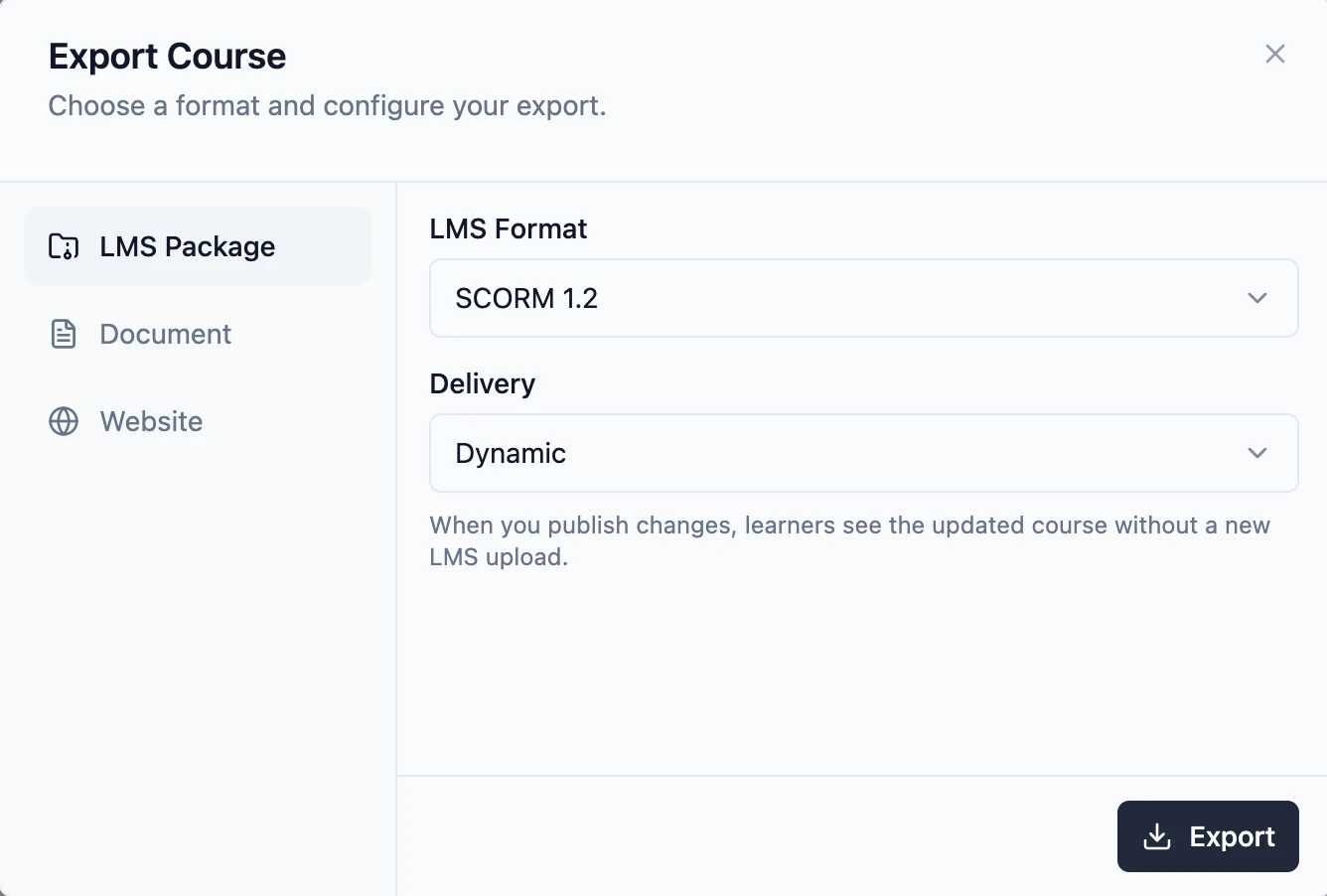
From the learner's perspective, the course still opens inside the LMS. From the administrator's perspective, completion status, score, and bookmarking still report through SCORM. The difference is where the course content comes from: Slate serves the current published version when the course launches.
This also keeps the uploaded package small. Media and course data do not need to be copied into every package because they are delivered from the hosted version. Learners do need an internet connection while taking the course.
Publishing an update
For routine content changes, the workflow is simple:
- Edit the course in Slate.
- Open the Publish menu and select Publish Update.
- Review the confirmation and publish the latest course content.
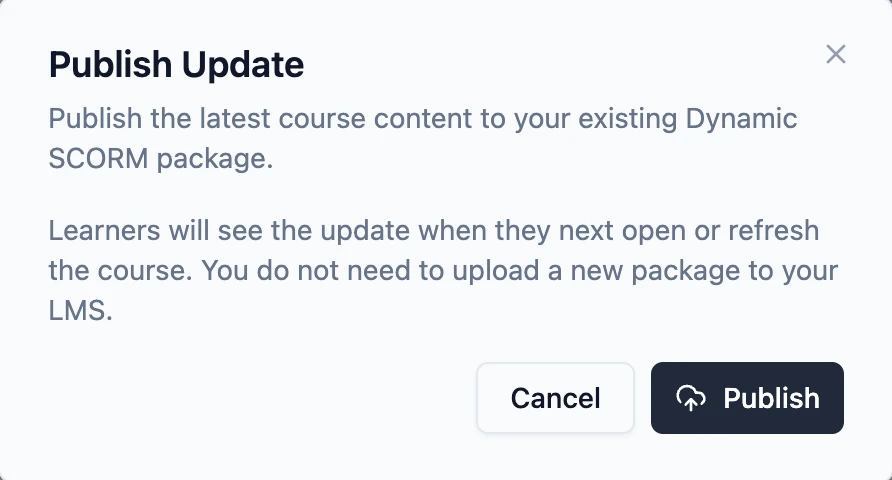
Every active Dynamic SCORM package for the course stays connected to that published version. Learners receive the update when they next open or refresh the course, with their SCORM progress preserved.
Most text, media, lesson, block, and theme changes can use this flow. Adding or removing the course assessment, or changing its passing score, alters settings in the SCORM manifest. Those changes require a new export and LMS upload because the LMS reads the manifest when the package is registered.
Standalone vs. Dynamic SCORM
| Feature | Standalone SCORM | Dynamic SCORM |
|---|---|---|
| Course content | Bundled in the ZIP | Hosted by Slate |
| Routine updates | Export and upload again | Publish in Slate |
| Internet required | No, after installation | Yes, during the course |
| LMS tracking | Completion, score, bookmarks | Completion, score, bookmarks |
| Best fit | Stable or offline content | Changing or multi-LMS content |
Neither approach is universally better. Standalone SCORM gives you a portable, independent file. Dynamic SCORM reduces the work required to keep changing content current. When Dynamic SCORM returns, Slate will support both delivery options so course authors can choose the right fit for each course.
When Dynamic SCORM is a good fit
- Compliance and policy training: Update regulations, procedures, or required wording from one published course.
- Onboarding: Keep benefits, systems, contacts, and processes current as the organization changes.
- Product and customer education: Replace screenshots and guidance as features evolve.
- Multi-LMS delivery: Maintain one source when customers, business units, or regions install the same course in different LMS platforms.
It is less suitable for air-gapped environments, offline delivery, permanent archives, or courses whose content will not change. Those are good reasons to choose a standalone package.
Usage and plan details
With standalone SCORM, your LMS stores and serves the course. With Dynamic SCORM, Slate provides the live delivery layer: hosting the published content, serving media, checking access, and keeping the installed package connected to the correct version.
We plan to make Dynamic SCORM available on Pro with an included hosted-delivery allowance and clear usage measurement. Final limits, pricing, and options for higher-volume delivery are still being worked out.
We are evaluating the structure against actual delivery activity, including data transfer, media, and request volume. We will publish how usage is measured and what Pro includes before launch.
Returning soon to Pro
Dynamic SCORM is returning soon to Pro. We plan to include an allowance and clear usage measurement, but the final structure is not set yet.
For setup instructions and current limitations, read the Dynamic SCORM documentation. You can also read the latest plan details as we prepare the feature's return.